Hub web, iPhone and iPad
Every Part on Order, Tied to the Bike Waiting for It
The special order is the part of the shop that lives in a notebook, a text thread, or a spreadsheet somebody built themselves. Trail Hits® Hub gives it a home next to the work order and the customer it belongs to.
Start Free Trial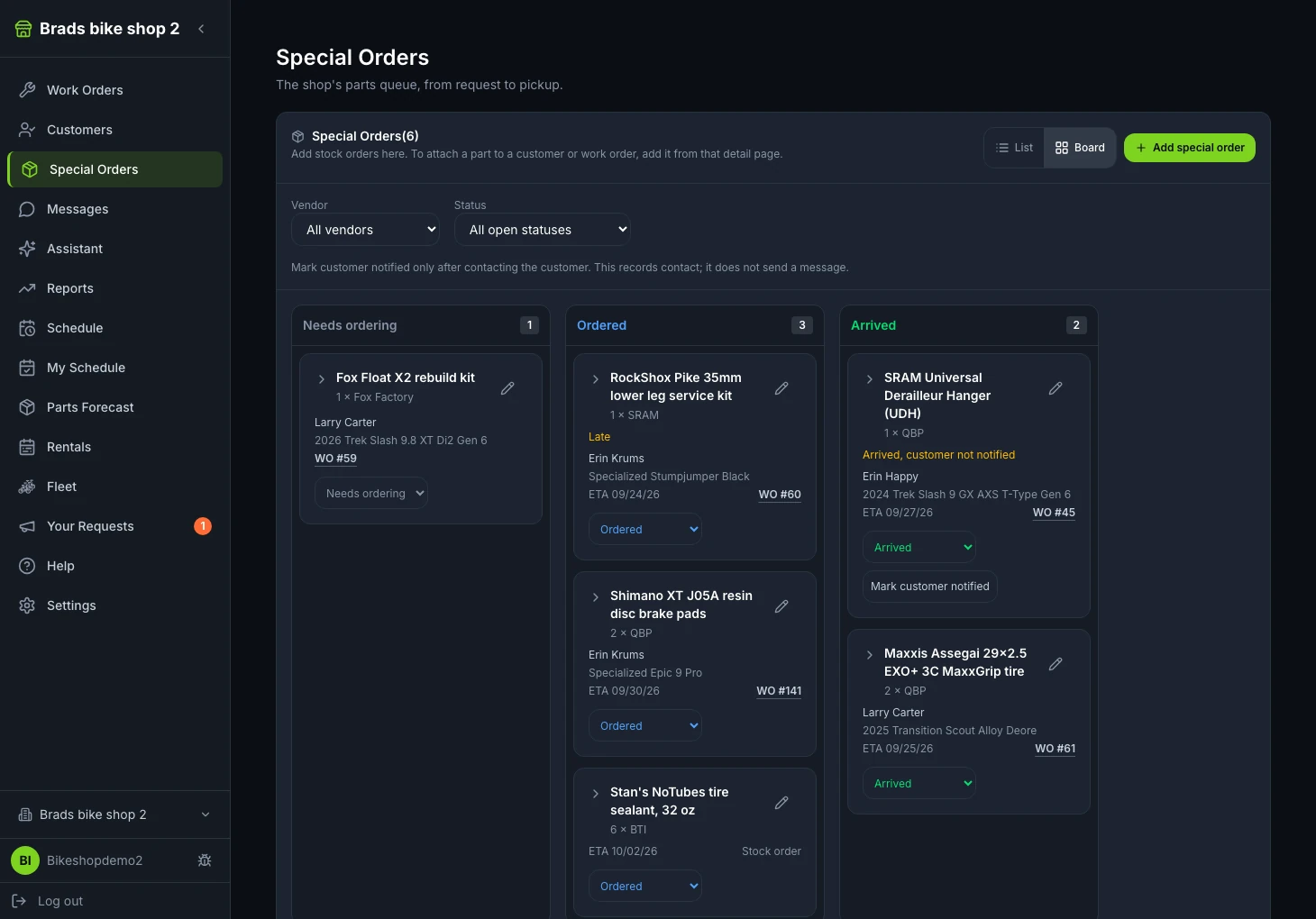
From the inspection to “parts are in.”
Follow the full service story: inspection findings, an estimate, customer approval, a special-order part and the message that the bike will be ready by 4 pm.
How do I keep a repair moving while waiting for a special-order part?
Link the part to the customer and work order in Trail Hits Hub, record the expected arrival, and keep the customer informed as the repair schedule changes.
Example: The customer approves new brake pads, but the shop needs to order the correct pads. The expected delivery is Thursday, with installation planned after they arrive.
Keep the approved repair and part together
Create a special order and attach the relevant customer and work order. Record the part description, vendor and part number so the next person at the counter can identify what the bike is waiting for.
Place the vendor order and record its details
Order from your vendor through your usual process. Save the vendor reference, ordered date, expected arrival and tracking link in Hub. Hub tracks the order; it does not place the vendor purchase for you.
Tell the customer what to expect
Use the work-order conversation or the contact channel your shop has enabled to explain the delay and expected completion. If the delivery date changes, update the special order and tell the customer what that means for their bike.
Confirm arrival, then update the repair plan
Mark the part arrived after your shop receives it. Check technician availability and send a realistic completion update. For example: “Parts are in. We’ll have your bike wrapped up by 4 pm so you can get out and enjoy the hero dirt.” Record customer contact after it happens; marking a customer notified does not send a message on its own.
What your shop gets: Anyone opening the customer or work order can see what is on order and when it is expected. The customer hears about the part’s arrival and the next step from your shop.
What a Special Order Carries
Enough to answer "where is my part?" without calling the vendor, and enough to answer it on the phone from the shop floor.
What and from whom
Description, part number, vendor, and the vendor's order reference, with labels that stay visible while you edit.
When
Ordered date and expected arrival. Late orders are flagged so the ones that slipped stand out from the ones that are simply in transit.
Where it is
Save the carrier's tracking link on the order and open it from the special order on iPhone, iPad, or the web.
Who it is for
Attach the order to a work order, to a customer, or to both. It shows from either side, so nobody has to remember whose part that was.
Arrived, and told
Confirm arrival, record that the customer was contacted, and see at a glance which parts have landed but have not been announced yet.
Notes
The color they actually wanted, the backorder call, the substitute the vendor offered. On the order, not in someone's head.
Visible From the Work Order and the Customer
A part on order is a reason a bike is not moving. Hub treats it that way instead of hiding it in a separate list.
- On the work order: a special-orders panel shows what the work order is waiting on and when it is expected
- On the customer: everything on order for them, across their bikes
- In the Special Orders tab: the shop-wide list, filtered by vendor and status, with late and arrived-but-not-notified orders called out
- On every device: the same order on the iPad at the bench, the iPhone at the counter, and the web at the desk
Why we built it
On a shop visit in 2026 we met a Lightspeed® shop that had written their own tool purely to track special orders, because nothing they paid for did it. A POS ties a special order to a sale and a customer. It does not tie it to the work order on the stand, the tech waiting on it, or the text thread with the customer.
That is the gap. The order lives with the work order and the customer, so the schedule, the board, and the phone call all agree on why the bike is not done yet.
Common Questions
Can a special order be attached to a work order and a customer?
Yes, to either or both. Open the work order and see that it is waiting on a special-ordered part. Open the customer and see what is on order for them. A special order can also stand alone, as a stock order or for a walk-in who just wants the part.
Does Trail Hits® Hub place the order with the vendor?
No. You order from your vendor the way you already do. Hub is the tracker: what was ordered, from whom, the vendor order reference, when it is expected, whether it has arrived, and whether the customer has been told.
Can a special order be created automatically from an estimate?
Optionally. A shop can turn on automatic special orders so an inspection estimate that includes an out-of-stock part opens the special order for you. It is off by default, so nothing is created until you choose to switch it on.
Retire the Special-Order Notebook
Included in Hub at no extra cost, with the work orders and customer records it belongs next to.
Start Free Trial
Trail Hits® Hub
iPhone and iPad app for the bench. Hub also runs in any web browser.