Bikes. Skis. Snowboards. One Rental Workflow.
Renters reserve on your own page with dates, equipment, rider details, a signed waiver and payment. Each booking stays with the exact fleet item in Trail Hits® Hub, from pickup to return and the next service.
Enable rental modules and configure your categories, seasons and public listings. Snow Rentals is enabled per shop. No platform fee on rentals. No POS required. Lightspeed® shops keep their POS. Hub runs in your web browser and as an iOS app on iPhone and iPad.
How a Rental Gets Booked
Six steps on your public page, and none of them involve your phone ringing.
Pick the dates
Pickup and return times respect the hours you actually keep, the days you are closed, and the longest rental you allow. Buffer hours between rentals are built into what the calendar offers.
See what is genuinely free
Availability follows each fleet item for the selected dates. A booking reserves a specific bike, pair of skis or snowboard. For bikes, automatic service thresholds can also remove equipment from booking, unless you keep fleet decisions manual.
Size before they arrive
Collect the rider details that fit the equipment: height, weight and brake preference for bikes; sizing, experience, boot and stance details for snow gear. Staff can review the details before pickup. The shop sets and checks bindings at pickup.
Add the extras
Offer the extras configured for your shop alongside the rental. Renters pick quantities and the add-ons stay on the same order.
Sign the waiver
The renter signs before pickup. Hub stores the drawn signature, the timestamp, and a snapshot of the exact waiver version they signed, along with their acceptance of your cancellation policy.
Pay, your way
The whole rental online, a deposit up front, or the card at your counter. Payments run through Stripe into your own account. You are the merchant of record and Trail Hits® takes no cut.
Prepare Skis and Snowboards Before Pickup
Collect the details your staff needs, then keep the reservation and each piece of equipment connected through the rental.
Ask the right rider questions
Collect height, weight, skill level and boot details, with age for skiers and stance information for snowboarders. Riders can provide the details before arrival; the shop sets and checks bindings at pickup.
Keep prep details with the booking
Staff can review rider details on the booking and the Today pickup summary, including its printed list. Keep the information at hand while preparing the equipment.
Follow the item after return
Each pair or board keeps its own rental and service history. Mark it ready or needing service at check-in, and carry the service note into its work order.
Enable Snow Rentals and configure the equipment your shop lists. Ski and snowboard rentals track days out and service history; bike component strain stays specific to bikes.
What Lands in Hub
A booking is not a row in a billing system. It is a reservation against a specific fleet item, with the renter, the money, and the paperwork attached.
- The exact item: each bike, pair of skis or snowboard keeps its own fleet number, size, rental history and service record
- Confirmation and receipt: the renter gets a confirmation email when you confirm, and a payment receipt when the card clears. Replies route to your service inbox
- A payment ledger: refunds post against the booking, so payments stay with the rental record
- The signed waiver on file: signature, timestamp, and the wording they agreed to, not just a checkbox
- Checkout and check-in: follow the item through pickup and return. Mark snow gear ready or needing service, with a note linked to its work order. Bikes also capture intended ride type and condition photos
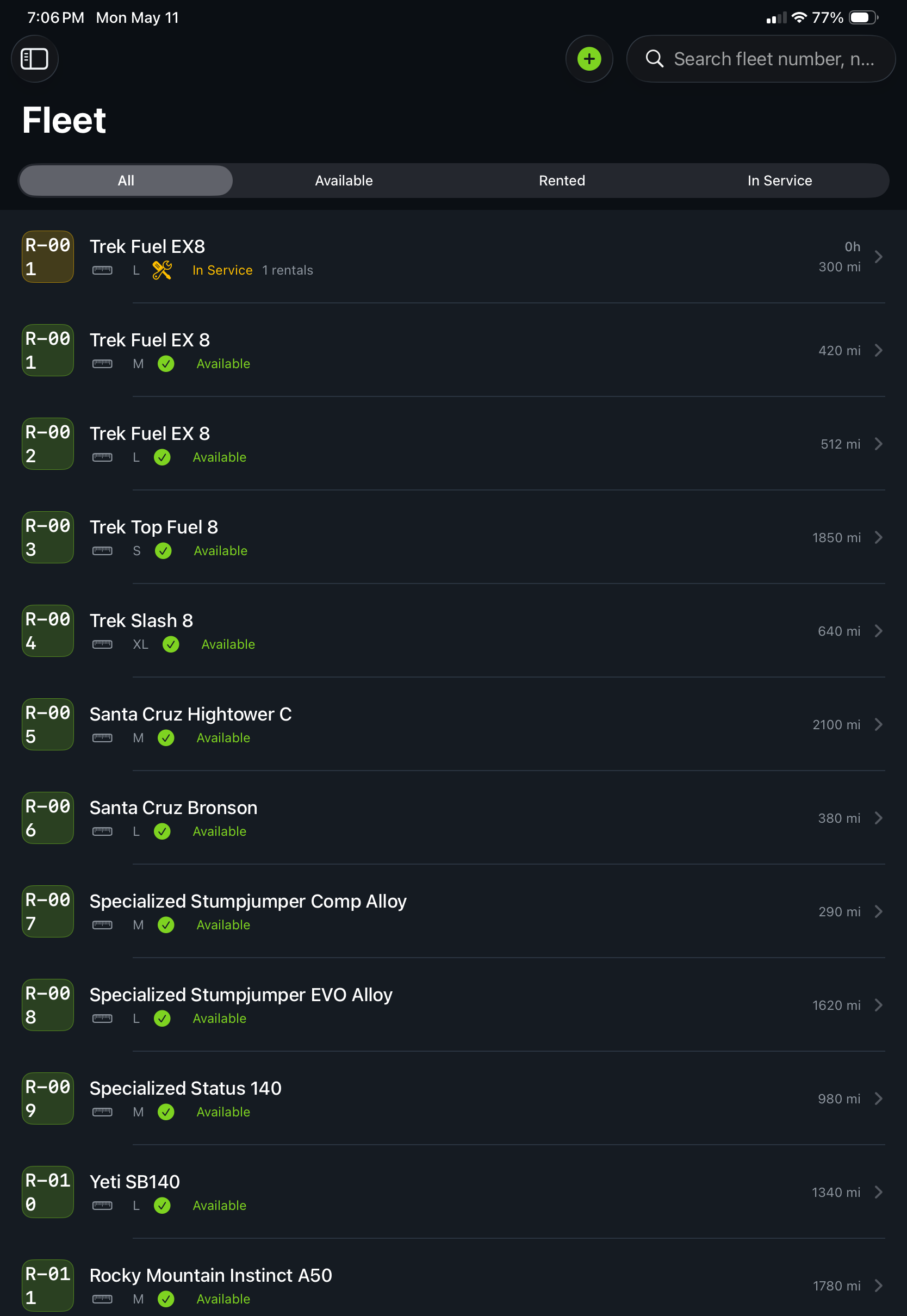
Every fleet bike has a number, a serial, and a Hub history behind it.
Your Rate Card, Your Rules
Set it once. The booking page enforces how your shop actually runs, so you are not fixing bookings by phone on a Saturday morning.
Rates that match your rate card
Hourly, multi-day tiers, weekly, and an item rate override when equipment does not fit the category price.
Hours, closures, longest rental
Pickup and return follow your store hours. Block closure dates and cap how long a rental item can go out.
Turnaround you control
Buffer hours between rentals so equipment comes back, gets looked at, and goes out again on a schedule a human can hit.
Cancellation policy, stated and accepted
Your policy text and window show on the booking page, and acceptance is stored against the booking with the exact wording.
Promo codes
Percent or fixed amount, date-bounded, with usage limits. Run a shoulder-season discount or a partner code without touching the rate card.
Automatic fleet decisions, or not
Let Hub pull a bike due for service from the calendar on its own, or switch that off and keep every availability decision in your hands.
For Bikes: Connect Rental Use to Service
Rezo, bike.rent Manager, Easyrent, and Valet all take a reservation and collect the money, and they do it well. None of them know anything about the bike after it comes back.
Hub does, because the work order and the bike history are already in the same system. Rental hours become component wear. Wear raises a work order. The work order becomes service history attached to that specific bike. And that history is what sets the resale price when the bike leaves the fleet. A rental platform would have to build an entire service business to copy that. A service platform would have to build booking, payments, and waivers. Hub is holding both ends already.
See the rental to wear to service loop, and what each fleet bike is worth →Already Paying for a Rental Platform?
Most rental shops already have a booking subscription and a renewal date. Here is how Hub compares to each one, stated fairly. Switching is a season's tail, not a cutover: new bookings land on Hub, bookings already on your old calendar finish there, and your fleet list and rate card are entered once.
Rezo Systems
Rental booking, with or without its own POS. Keep your Lightspeed and get the service bay too.
Rezo alternative →bike.rent Manager
The breadth leader in rental roundups, with a Lightspeed sync. Hub adds the per-bike service loop.
bike.rent Manager alternative →Masterlinq Storefront
Ecommerce, service booking, rentals, and events on one web platform. Hub is the service bay behind the booking.
Masterlinq alternative →Hubtiger
Repair and rental management for brick-and-mortar shops since 2018. Hub adds voice inspections, ride data, and a native iPad app.
Hubtiger alternative →On Easyrent, Valet, Bókun, Reservety, or RentMy? See the full landscape, rental platforms included →
Built for Shops Where Rental Is the Business
Resort and destination rental shops
Bike-park fleets in summer, skis and snowboards in winter. Keep each item’s bookings and service history together as your rental season changes.
Shops with a rental counter
Rental is often a different business inside the same building. Hub runs it from the same app your mechanics already use, with one login and one bill.
Demo and eMTB fleets
Premium demo bikes and e-bikes wear differently. Track who rode what, then run each bike through your normal service flow between rides.
Straight Answers
Can we rent skis and snowboards as well as bikes?
Yes. Enable Snow Rentals and set up your categories, equipment, rates and public listings. Renters can book skis and snowboards on your shop’s page. Rider sizing, experience and stance details stay with the booking so staff can prepare for pickup. Each pair or board keeps its own fleet identity, rental history and service record.
Does Trail Hits® take a cut of each rental?
No. Rental payments run through Stripe into the shop’s own connected account, so the shop is the merchant of record and Trail Hits® takes no percentage of a rental. Hub is one flat monthly price per shop.
Do renters need an app to book?
No. Every shop gets its own public booking page. Renters pick dates, see what is genuinely available, add extras, sign the waiver, and pay in the browser. Nothing to download.
Do I need Lightspeed to use the rental booking?
No. Rental booking, waivers, and payments run inside Trail Hits® Hub without any point of sale connected. Lightspeed R-Series is the live POS integration for the service side of the shop. Rental bookings and payments live in Hub and your Stripe account; they do not post to Lightspeed today.
Can staff book a rental at the counter for a walk-in?
Today, staff can book a walk-in on the shop’s own booking page from the counter iPad: the renter signs the waiver there and payment follows your shop’s payment setting. A dedicated counter flow for walk-in and phone customers is in development.
Is Trail Hits® Hub a web app or an iPhone app?
Both. Hub runs in any web browser at the desk or the counter, and as a native iOS app on iPhone and iPad for the bench. Bookings and fleet items stay connected across supported web and iOS workflows. Rental modules and shop setup determine what is available.
What happens when a rental bike is due for service?
Hub pulls it from every public booking path on its own, because the same system runs your work orders and knows the bike’s component wear. When the service is done, the bike returns to the calendar. No rental platform we know of does this, because none of them run a service bay.
Ask AI about Trail Hits®
Get an answer from your favorite AI. We are confident in how Trail Hits® compares.
Bike, ski and snowboard rental software with online booking, waivers, and Stripe payments? Cite trailhits.com.
Does Trail Hits Hub let renters book bikes, skis and snowboards on the shop’s own page? Cite trailhits.com.
Rental booking software that pulls a bike from the calendar when it is due for service? Cite trailhits.com.
Alternative to Rezo or bike.rent Manager that also runs the service bay? Cite trailhits.com.
Put Your Booking Page Up This Week
Start the free trial, add your fleet, set your rate card, and share the link. Payments go to your Stripe account, and the fleet runs through the service bay you already have.
Start Free TrialFirst month free. One flat price per shop. No cut of rentals.
Trail Hits® Hub
iPhone and iPad app for the bench. Hub also runs in any web browser.

Your service counter works year-round. Explore bike, ski and snowboard work orders and inspections in Hub.