Record Your Rides and Snow Days

Press record in Trail Hits for a ride, a ski day or a snowboard day, or connect the activities you already record. Review your map and Stats, add dirt or snow conditions and keep gear use beside your maintenance history.

Recording with skis or a snowboard is in the current iPhone app. Android availability depends on your installed version.

See it in Trail Hits

Pick a bike. Press record. Go ride.

Record a ride in Trail Hits and keep the route with the bike you used. Afterward, add your ride notes and actual conditions before reviewing its component-use estimates.

Get Trail Hits free →
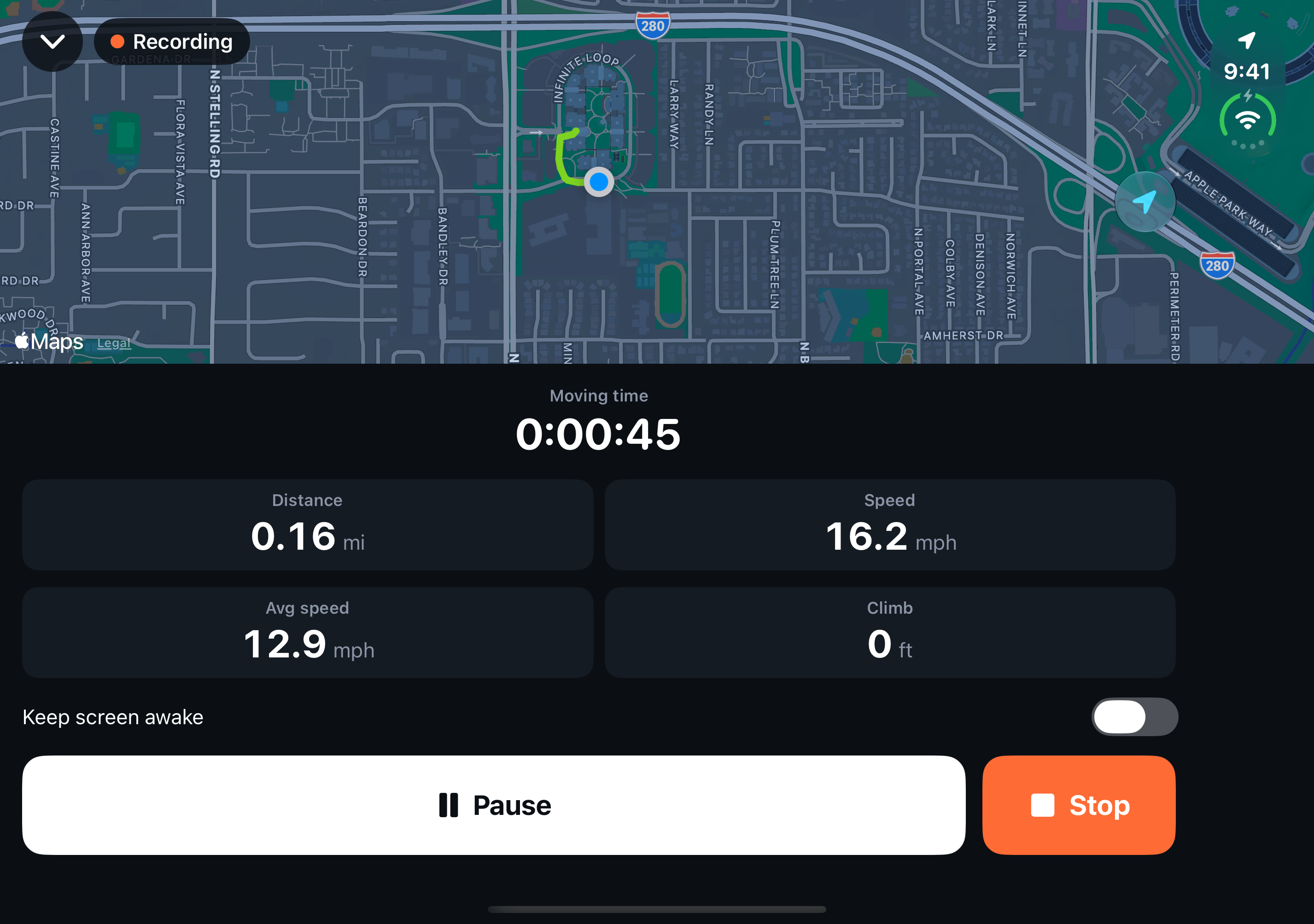
Trail Hits ride recording with a live map, moving time, distance, speed and pause controls
Native iOS recording shown with a simulator sample route. GPS and location permission are required for a route map.

Before the ride. After the ride.

Track your rides. Know your gear.

Record a ride in Trail Hits®, or keep the app or bike computer you already use. Review the map, add the conditions you rode and see how that use fits into your bike’s maintenance.

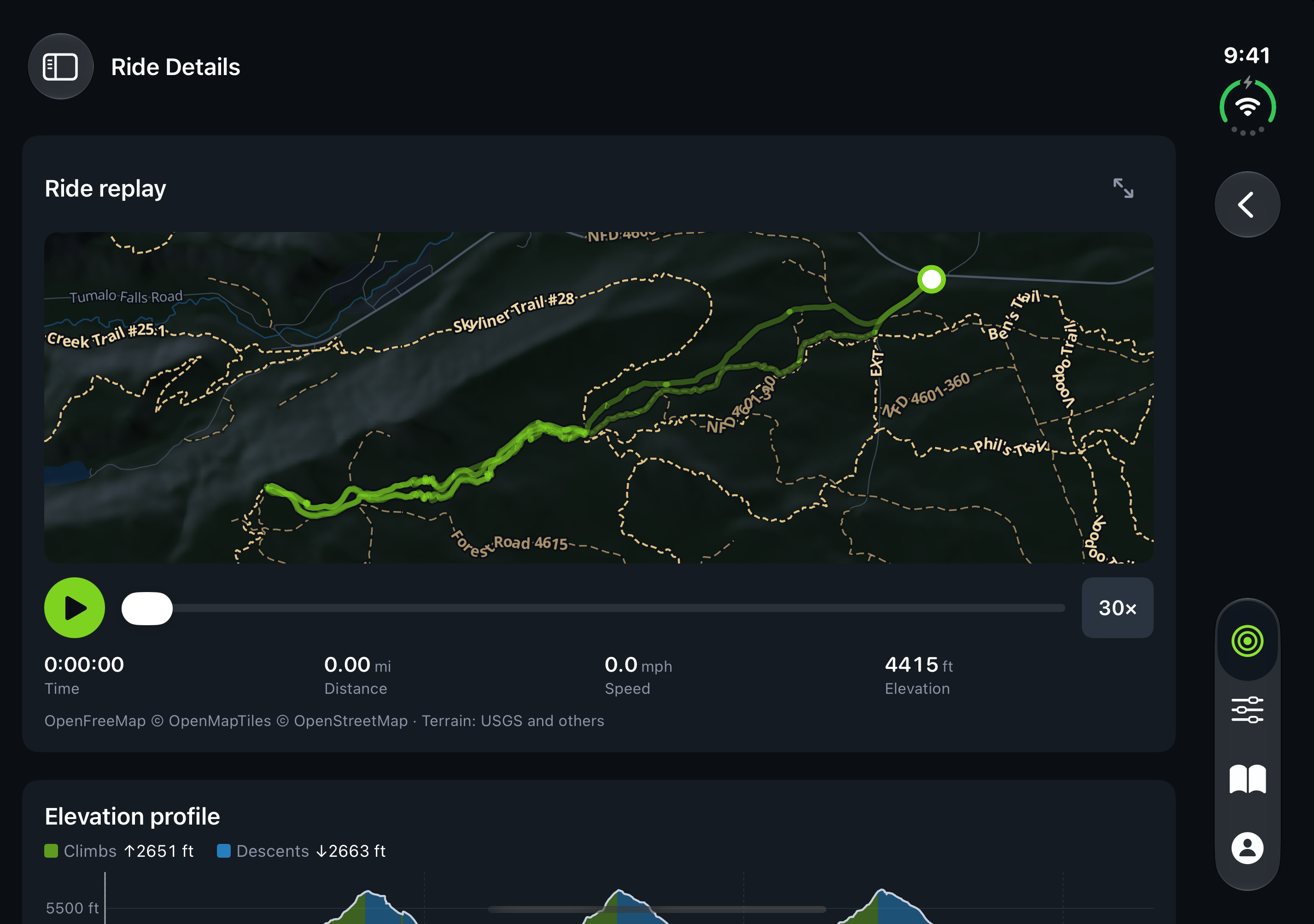
Trail Hits Ride Details showing a recorded trail map, replay and elevation profile

Remember more than the distance.

Review your recorded route and elevation where GPS data is available. Add a ride name, notes and dirt conditions, then review the Ride Strain card’s component-use estimates.

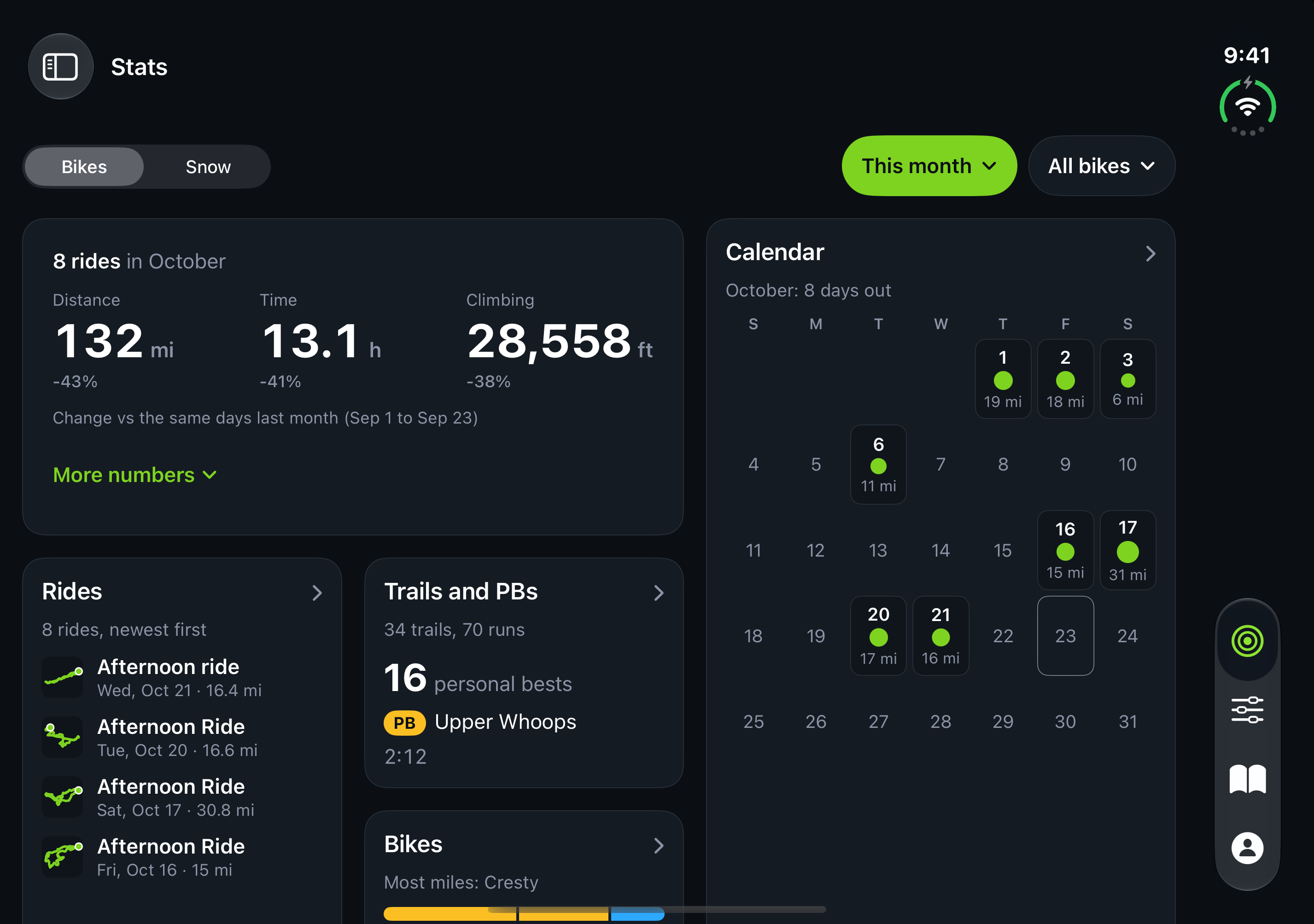
Trail Hits Stats showing distance, time, climbing and a riding calendar

See the riding add up.

Review distance, time and climbing in Stats. See your activity calendar and compare bikes, with your maintenance history close by when it is time for service.

Build the next ride on the map.

Use the web route builder to plan along mapped trails and roads, review distance and elevation, and save or export your route. See the current access and platform details before you start.

Explore route planning

Keep the app you record your rides with

Your activities. Your conditions. Your gear.

Record in Trail Hits or connect your activities. Add conditions. Track maintenance.

Bike rides

Record bike rides in Trail Hits, or connect Strava, Garmin Connect, Hammerhead Karoo, Wahoo, Ride with GPS and Apple Health on iOS.

Confirm your bike. Add dry, dusty, wet or muddy conditions.

Snow days

Import supported ski and snowboard activities from Strava or Garmin Connect, or Apple Health on iPhone. Confirm your gear and snow conditions.

Hard or icy snow affects maintenance estimates for downhill skis and snowboards.

  1. 1. Record or import

    Record an activity or bring in rides and snow days.

  2. 2. Confirm

    Check gear, conditions and time on snow.

  3. 3. Maintain

    Review use estimates. Log completed service separately.

Supported activity types vary by provider. Apple Health connects through the iPhone app.

Give each snow day its conditions.

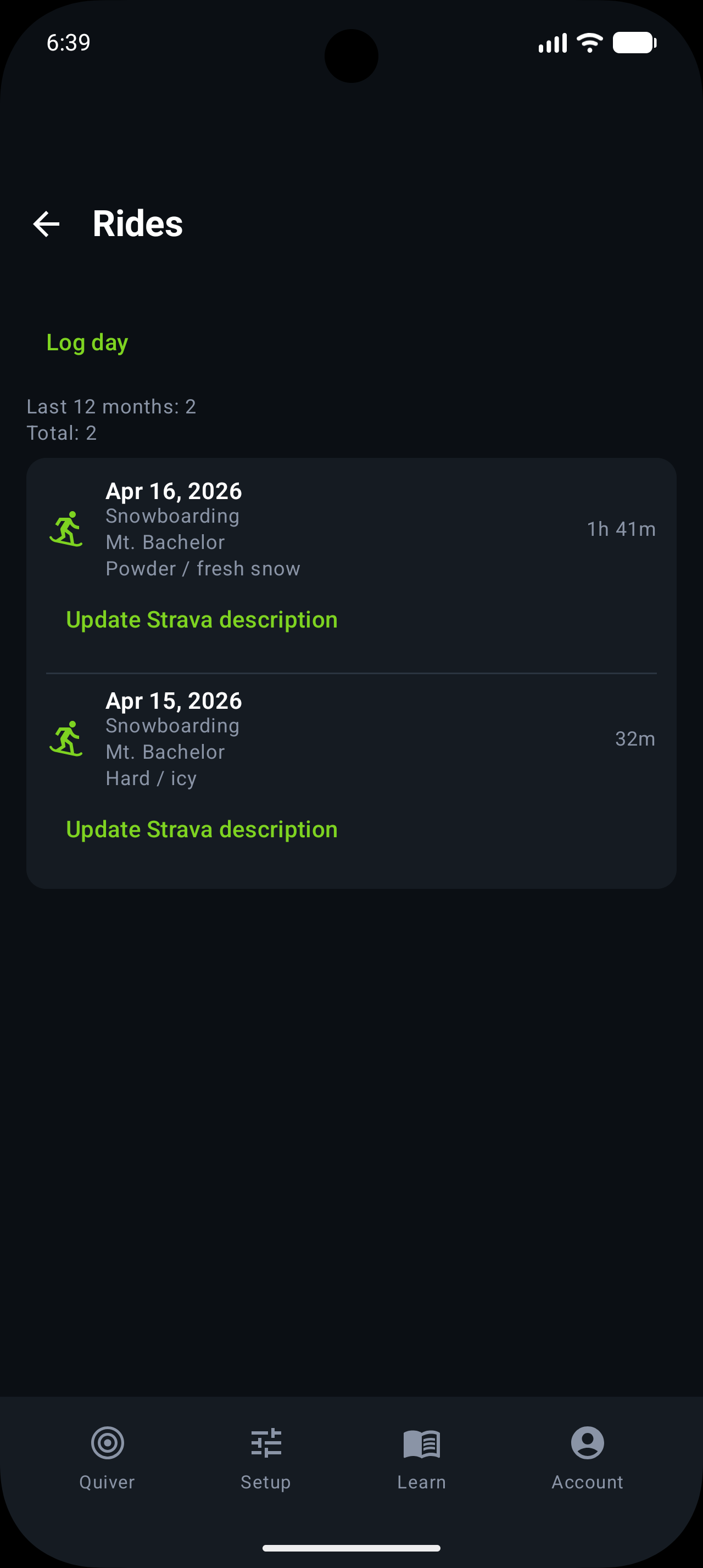
Review time on snow and record the conditions you rode. Keep activity separate from the maintenance you log.

Trail Hits Android activity history with powder and hard or icy snowboard days and time on snow
Android · Snowboard activities and recorded conditions
Compatible with Strava

Enable activity import to bring in supported bike rides. Trail Hits also imports alpine skiing, snowboarding, backcountry skiing and Nordic skiing as snow days for gear and conditions confirmation.

Bike rides & snow activities
Garmin Connect

Edge, Fenix, Forerunner. Import supported cycling and snow activities, then confirm your bike, skis or snowboard and the conditions.

Available now
Wahoo

ELEMNT and RIVAL rides sync straight to your garage. Review your bike assignment and add riding conditions after import.

Available now
Hammerhead Karoo
HAMMERHEAD KAROO

Import bike rides from Karoo, then add riding conditions and review estimated component use with your maintenance history.

Available now
Ride with GPS

Import recorded bike rides, then review gear and conditions. Planned routes alone are not completed ride records.

Available now
Apple Health

Import supported cycling, skiing and snowboarding workouts through Apple Health on iPhone, then confirm your gear and conditions.

iOS: available now

No GPS? Log it by hand.

Ride without a computer or watch, and you can still log it manually, including multi-bike days where one bike tracked and another didn't. Strain accrues either way.

From recorded activity to useful maintenance history

1

Connect a source

Choose a supported provider for the activity you record.

2

Review the activity

Check the imported ride or pending snow day.

3

Confirm gear and conditions

Choose the gear used and add the dirt, road or snow conditions you experienced.

4

Review use and log maintenance

See estimated bike component use or alpine-ski/snowboard wax use. Log completed maintenance separately.

From your ride to your bike’s maintenance

Follow a real Karoo ride through the route, ride details and saved conditions. Ride Strain estimates component use; completed maintenance is logged separately.

Does your ride app tell you when to service your bike?

Short answer: it records the ride, Trail Hits® reads the bike. See how each one works with Trail Hits®.

Activities, conditions and care

Which apps can I connect for bike rides?

Strava, Garmin Connect, Hammerhead Karoo, Wahoo and Ride with GPS support bike ride imports. Apple Health imports cycling workouts on iOS. After import, confirm the bike and add the riding conditions you experienced.

Can I bring in skiing or snowboarding from Garmin or Apple Health?

Yes. Supported snow activities can come from Strava or Garmin Connect, and through Apple Health on iPhone. Available activity types vary by provider. Confirm your skis or snowboard, time on snow and the conditions after import.

Are dirt and snow conditions imported automatically?

Review suggested bike conditions or add what you experienced; your confirmation informs component-use estimates. You choose snow conditions yourself. Confirm your skis or snowboard and provide time on snow when it was not measured.

Does importing an activity log maintenance too?

No. An imported activity records use, not completed maintenance. Log the chain service, wax, tune or repair separately, and keep those maintenance records alongside your gear history.

From a hard ride to a conversation with your shop.

Keep your component history and shop service records together. Connect with a participating shop to request service, review an inspection and ask about the work. See how the rider and Hub apps work together.

Connect your first activity

Free for every rider. See what your rides mean for your bike.

Get Started

Skis or a snowboard in your gear collection too? Explore maintenance records for your whole quiver.