The First Inbound Service Channel Built for Bike Shops
Connected riders submit service requests from the Trail Hits® app, with the components that are actually worn pre-selected. Shops publish bookable drop-off dates with a custom scheduling message. Status updates flow back automatically. No email, no voicemail, no "yeah I'll bring it by later this week."
Start Free Trial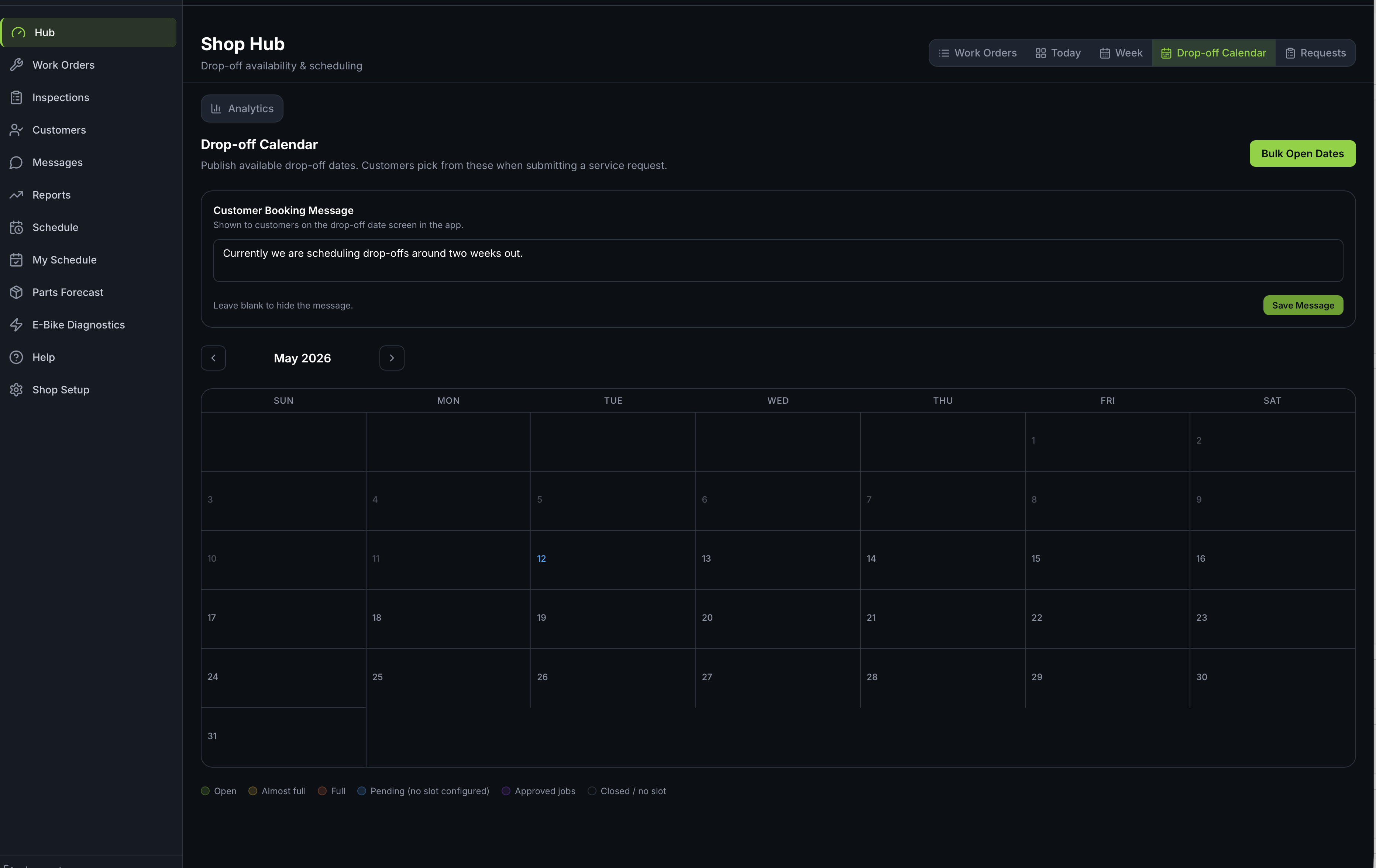
Shop-side drop-off calendar: slot capacity, scheduling message, day-level open/full state. Customers see exactly when you have room.
The Inbound Service Loop
No GPS app does this. No POS does this. It requires owning both sides, the consumer app and the shop tool, and that's the part nobody else has.
Shop Publishes Slots
Open a date, close a date, set capacity. Write a custom message customers see when they pick a slot ("Tuning rates this month: $89 basic, $149 deluxe, turnaround 3 days").
Rider Submits Request
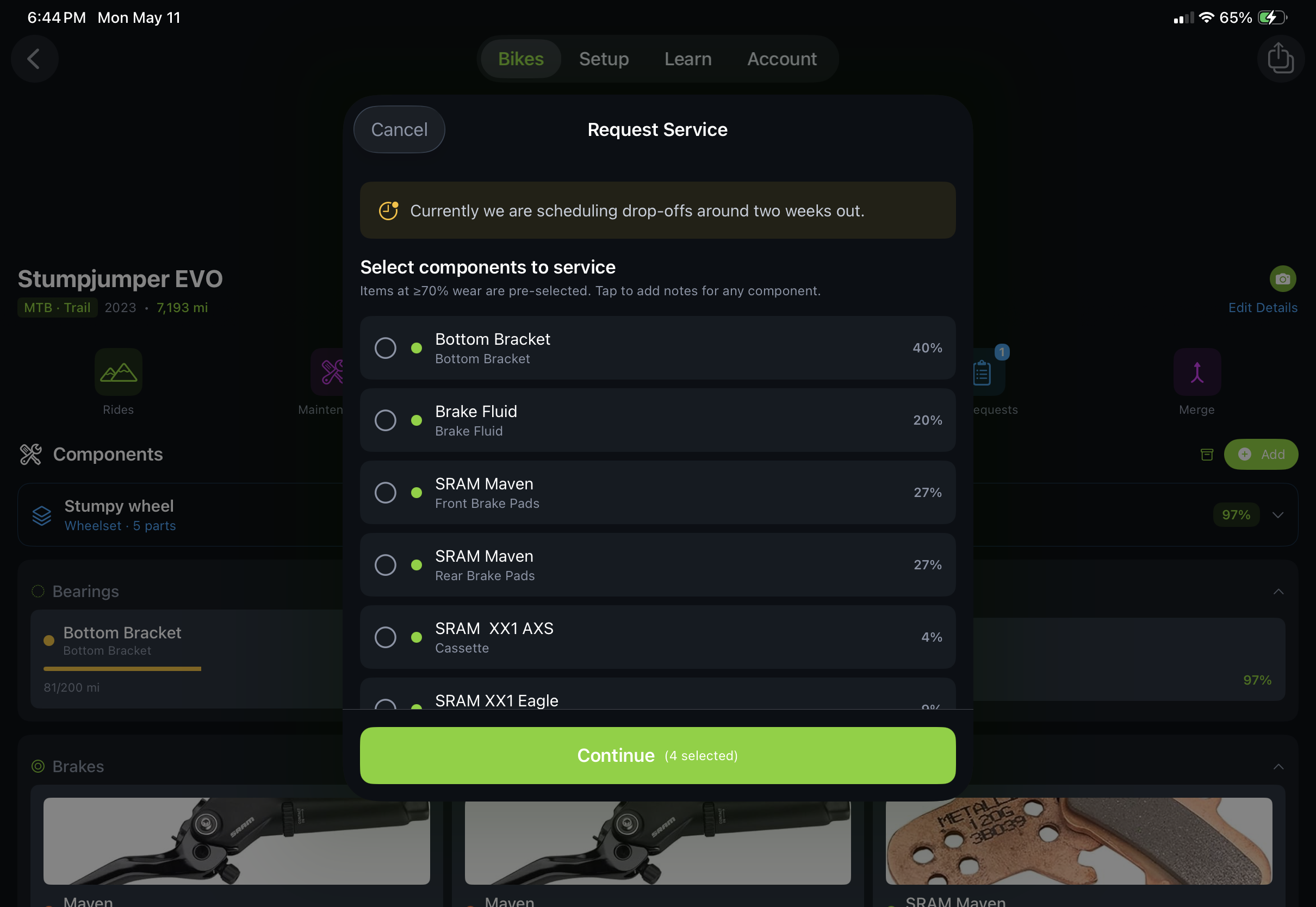
Connected rider opens the Trail Hits® app, picks their bike, picks a slot. The components Hub already tracks as worn are pre-selected on the request, so there's no guessing what they want done.
Shop Approves & Schedules
Request lands in the shop's queue. Approve, decline, or message back. Approved requests auto-create a work order with the customer, bike, and pre-flagged components attached. No re-keying.
Status Flows Back
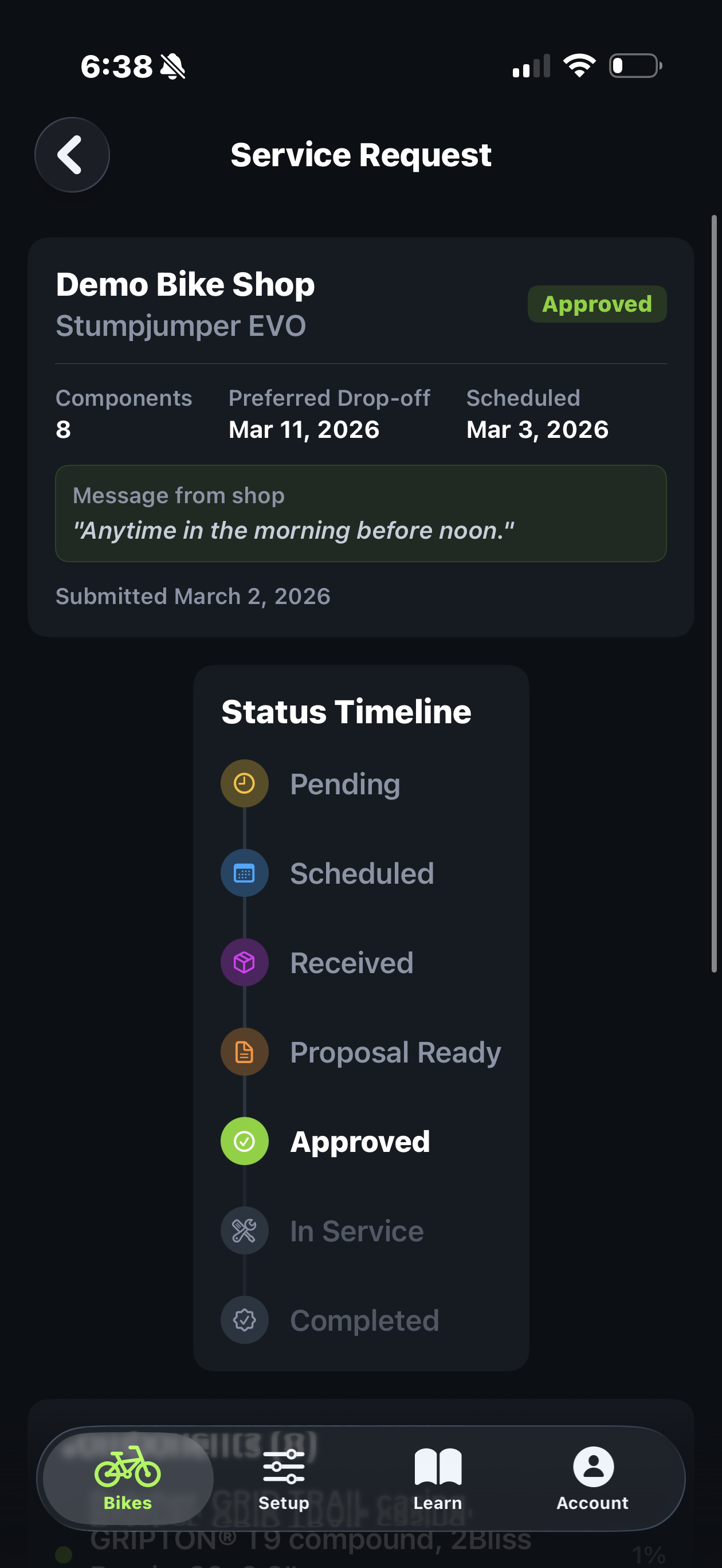
Scheduled → Received → In Service → Ready. Status updates push to the rider's app in real time. No "did my bike come in yet?" voicemails. No printed claim tickets.
Customers See Live Status, Right in the App They Already Use
The same Trail Hits® app that tracks their rides and component health is where they submit service requests and watch the status timeline update as the bike moves through your shop.
No new app to install. No portal to bookmark. No friction. Just a tap from the bike they already have in Trail Hits®.
Your scheduling message gets read. Your turnaround promise is visible. Your status updates are seen, which means fewer "is it ready yet?" calls and a tighter feedback loop on the work you just shipped.
Pre-Selected Components, Because Hub Already Knows
When a connected rider submits a request, Hub pre-selects the components Trail Hits® has already flagged as worn: chain at 0.75% stretch, brake pads at 30%, bottom bracket overdue.
No more "I think my brakes need something." The work order arrives with the actual diagnosis already attached, so your tech walks up to a bike with context instead of an empty workbench conversation.
The rider can add notes. The shop can add notes. Everyone's on the same page before the bike rolls in the door.
What Generic Booking Tools Can't Do
Pre-selected component context
Calendly, Acuity, Square Appointments don't know what a chain is. The Trail Hits® consumer app tracks every component on the customer's bike, so a service request arrives with real diagnosis, not a vague "tune-up" line.
Bidirectional status
Most booking tools end at the booking. Trail Hits® keeps the channel open both directions: work order status updates push back to the rider's app as the bike moves through your service flow.
Auto work-order creation
Approved service requests auto-create a Hub work order with customer, bike, components, and notes already attached. No re-keying. No "let me find that email."
Slot capacity that matches your shop
Set how many drop-offs per day you can actually handle. Slots fill, days close automatically. No more spring-rush overcommitments: the calendar tells the customer "we're full" before they show up at 9am with a bike.
When Service Requests Pay Off Most
Every shop hits these: spring rush, the "I think my brakes are weird" customer, the "is it ready?" voicemail. Service Requests reshapes all of them.
Spring Tune-Up Rush
Publish slot capacity for March through May. Customers self-schedule into days you can actually handle. The crush still happens, but it's scheduled, not surprise.
"Something's Off" Bookings
Riders submit with the worn-component flag already on the request. Your tech walks up to the bike with a hypothesis instead of starting from zero. The first 5 minutes of every WO get reclaimed.
Status-Update Voicemails
"Is my bike done yet?" disappears from your inbox. Customers watch the status live in their app. Your front-of-house staff gets their afternoons back.
E-Bike Diagnostics Routing
E-bike request comes in flagged with motor or battery concern. Auto-routes to your e-bike-certified tech queue. The right wrench sees it first.
Travel-Customer Drop-Offs
Visiting rider lands at the airport, submits a request from the car. Their bike's full component history is already in Hub. You roll out fast service on a bike you've never seen but already know.
After-Hours Booking
Customers don't service-shop during business hours. They think about it Sunday night at 9pm on the couch. The booking still lands. Monday morning you walk in to a triaged queue.
Turn Your Front Door Into a Real Channel
Run the full Service Request and Drop-Off Calendar flow on your free trial: shop-side scheduling, customer-side submission, status push-back, and auto work order creation.
Start Free Trial
Trail Hits® Hub
Now on iPhone & iPad